GPTAIClips
Video Pipeline Pro.
$149 one-time · Lifetime updates · Single-seat commercial license
- Claude Code
- Codex
- Perplexity
- Z.ai
A topic brief in. A finished episode out.
GPTAIClips Video Pipeline Pro is a fully-orchestrated production skill that turns a single topic brief into a finished, SEO-optimized, multi-language, YouTube-ready video — plus a matching lead-magnet PDF, a click-tested thumbnail, a CTR-tuned title, chapter cards, voice-over, layered sound design, and a post-upload comment-pin automation that closes the loop after upload.
- It is not a template pack.
- It is not a prompt library.
- It is not a Loom-recorded course.
It is a working production pipeline that has shipped 99+ episodes to a live public channel — and every design decision inside it was earned by running the pipeline in public, on real traffic, against a real algorithm.
Install in under 15 minutes.
- 01Download the zip. Unpack it into your skill directory.
- 02Launch the guided setup wizard — new in v8.3.1. It walks you through the whole install, question by question, and verifies each step before moving on.
- 03The wizard installs every dependency for you (runtimes, render engine, headless browser, fonts, audio pack) and writes your YouTube + Drive credentials into a single .env it generates.
- 04Run your first episode.
That's it. No dashboards to configure. No SaaS accounts to create. No API keys to buy. No cloud deployment. Runs on macOS, Linux, or Windows (WSL).
The 100+ step workflow loop — orchestrated for you.
Every episode passes through a supervised chain of over one hundred production steps. You never see them individually — you see the finished episode. But under the hood, the pipeline:
- Researches the topic across primary sources and normalizes findings into a structured brief
- Selects the right template variant for the topic — news drop vs. deep-dive vs. verdict piece vs. companion Short
- Generates and virality-scores a title using a 12-template CTR predictor
- Writes a chaptered VO script with open-loop-and-payoff structure
- Renders the VO in chunks, measures each chunk’s duration, syncs card timing to VO timing
- Builds every card through the brand-logo audit — refuses to save a card without a real brand mark
- Applies motion overlays synchronized to the VO, word by word
- Composes the audio bed — per-scene whoosh mapping, intro chime placement, 3-pass loudness locked at broadcast spec
- Renders the video, re-inspects it, then re-renders any scene that failed audit
- Builds the companion 5–6 page PDF guide with content-driven layout
- Generates 1280×720 thumbnails tested for contrast and face-forward composition
- Uploads to YouTube with SEO-optimized description, tags, and chapter markers
- Pins the correct comment via the browser-automation layer
- Logs the episode to Airtable with per-stage cost, wall-time, and render metrics
If any step fails, the loop catches it, backs off, retries with a different strategy, and only proceeds when the audit passes.
100% resilient — the loop that will not fail.
Most agentic video systems ship whatever comes out of the model on the first pass. When a step breaks, they either crash or silently produce a broken artifact. GPTAIClips Video Pipeline Pro is architected around retry-until-audit-passes:
- Every stage has a validator that checks output against a hard specification — VO length matches plan? Brand logo present? Card audit passes? Audio loudness in range?
- Every failed validation triggers a retry with an adjusted strategy — not a repeat of the same broken call.
- Every retry is logged, so you can see exactly what happened and why.
One prompt. Full episode.
The numbers, unretouched.
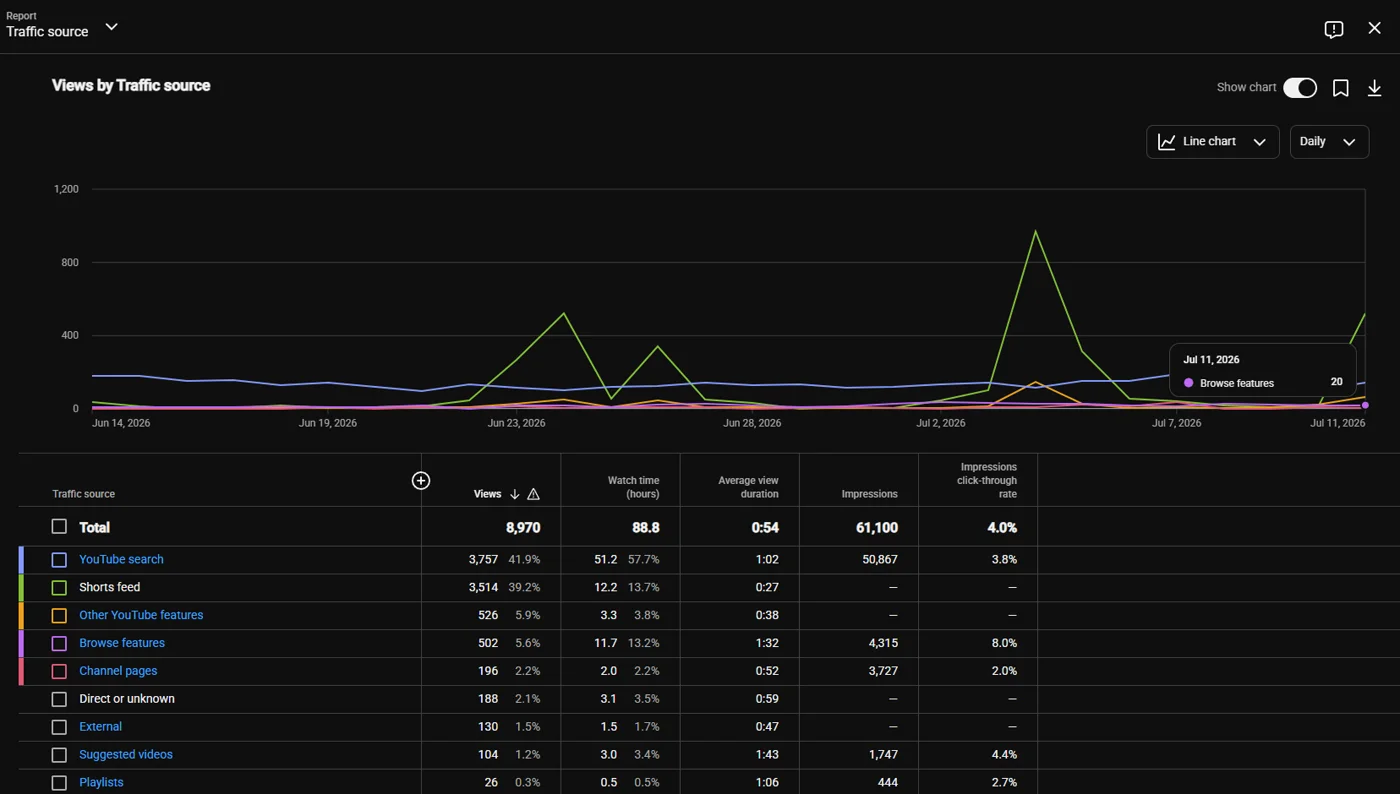
41.9% of views come from YouTube Search
- 8,970
- views · 28 days
- 88.8h
- total watch time
- 61,100
- impressions · 8.0% CTR on Browse
Most AI-video systems live and die on the Shorts feed. This one earns its search share — that is what “SEO-optimized” looks like in practice.
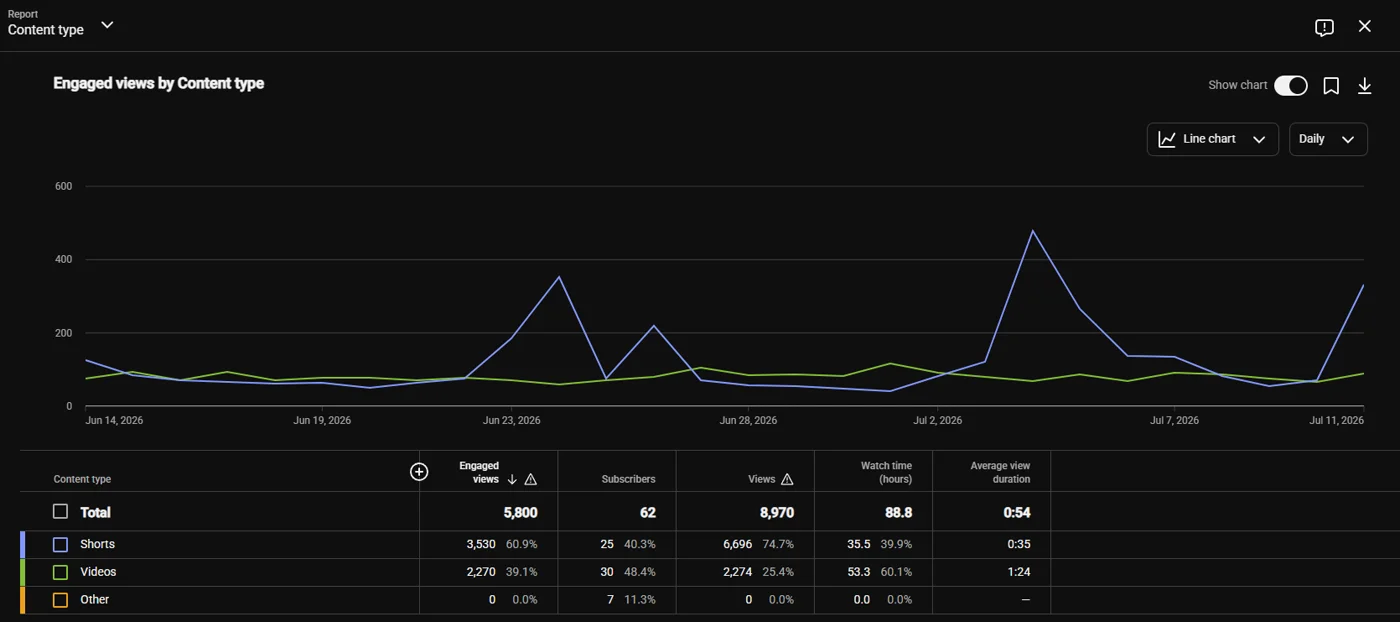
Longs and Shorts both pull
- 60.1%
- of watch-time from only 25.4% of views (longs)
- 1:24
- long-form average view duration
- 62
- subscribers gained · 28 days
The long-form template pulls the exact leverage ratio YouTube’s algorithm rewards.
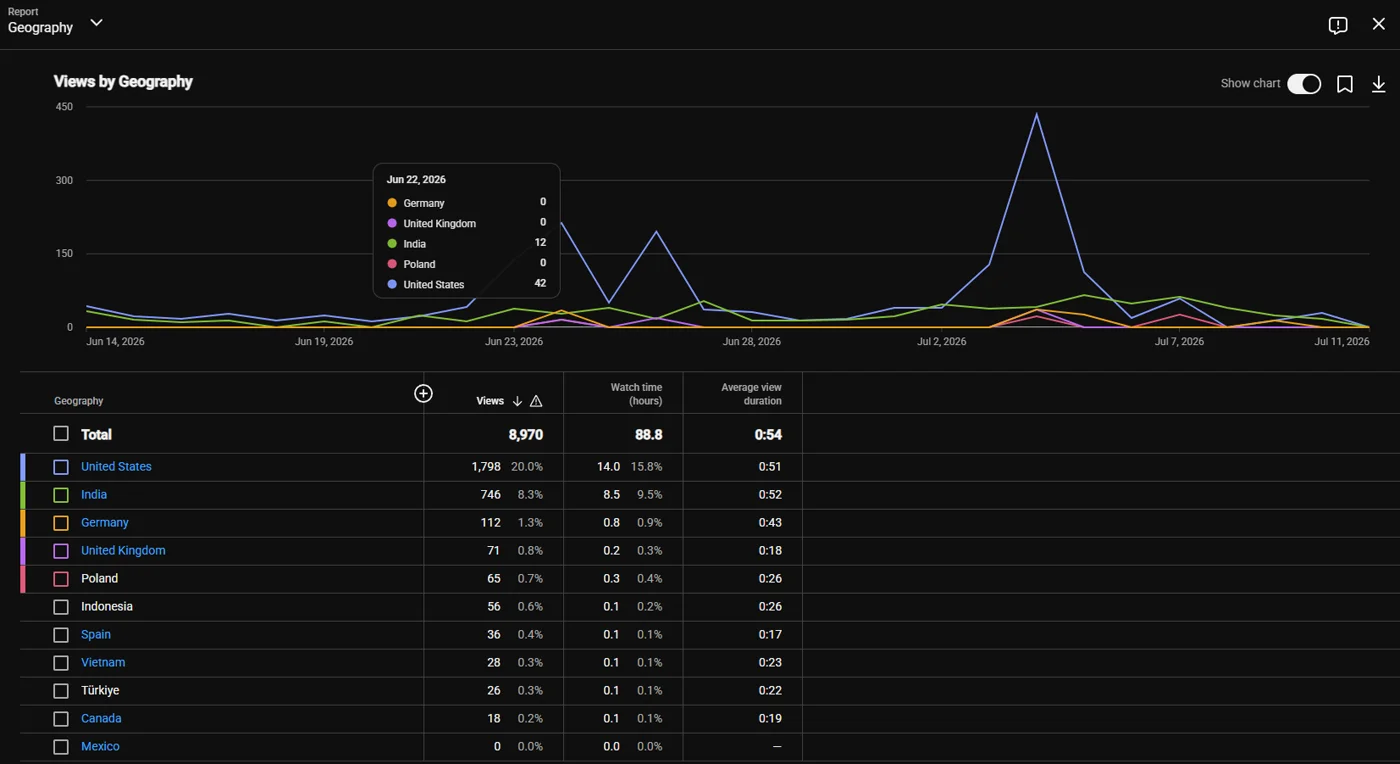
Global reach, English-first
- 20.0%
- United States · 1,798 views
- 8.3%
- India · 746 views
- 10+
- countries in a single 28-day window
This is why the multi-language dubbing layer matters — the pipeline ships every video dubbed, natively, as YouTube alt-audio tracks.
Script → Render → Publish.
- 01
Script
A topic brief becomes a chaptered script with a CTR-scored title — the 12-template virality scorer predicts performance before a single frame renders.
- 02
Render
Motion cards, VO-synced hero text animation, cinematic code-driven scenes, and a locked audio fingerprint at broadcast spec — with a brand-logo audit that refuses to ship placeholders.
- 03
Publish
Multi-language dub tracks, SEO metadata, thumbnail variants, upload, comment-pin automation, and a matching PDF lead magnet. Hands never touch a timeline.
Six production template styles.
Each template is a tuned end-to-end recipe with its own art direction, motion system, sound design, and pacing logic. Pick the style that matches the topic — the pipeline handles the rest. Adapt any of them to your niche and save the new workflow as your own template.
| Template | Best for | Signature look |
|---|---|---|
| stan-g1 | Fast news drops, tool announcements | 5 motion cards, punchy 45–90s cuts, licensed SFX bed |
| stan-g2 | Weekly digests, benchmark roundups | Hybrid card + motion overlays, dual-tone palette |
| stan-g3 | Consumer-Reports style reviews | Cinematic scorecard scenes, VO-driven animation |
| pro-g1 | Deep-dive tutorials | 8–12 chapter structure, animated hero text on every card |
| pro-g2 | Founder-angle comparisons, verdict pieces | 13-chapter arc with open-loop + reveal, animated brand grids |
| shorts-g1 | Companion Shorts + Reels | 9:16 vertical, 30–45s hook-and-payoff, matching thumbnail spec |
Every template ships with a locked audio fingerprint (intro chime, per-scene whoosh mapping, loudness locked at broadcast spec), a card-rendering system with a brand-logo audit that refuses to render a card without a real brand mark, and a card-to-VO synchronization layer that handles pacing automatically.
Everything after “render.”
- 01
Multi-language dubbing
Top languages — English, Spanish, Portuguese, Hindi, French, German, Indonesian, Vietnamese, Turkish, Arabic, and more — wired in as native YouTube alt-audio tracks. This is what turns 8.3% India and 0.6% Indonesia into real watch-time.
- 02
SEO titles, descriptions, tags & chapters
The title generator uses a 12-template virality scorer (leads-with-dollar, has-verdict, has-number, has-free) that predicts CTR before render. Descriptions are structured for the 41.9% search-traffic path documented above.
- 03
Automated thumbnails
1280×720 with tested contrast, face-forward composition, and A/B-ready variants — generated for every episode, longs and Shorts.
- 04
Comment-pin automation
A browser-automation script that, after every upload, deletes the wrong pinned comment and pins the correct one with your lead-magnet Drive link — closing a gap YouTube’s own Data API refuses to close.
- 05
PDF lead magnets
Every episode ships with a 5–6 page companion guide matching the video’s structure, ready for Drive with anyone-with-link permissions.
- 06
Credit-burn logging
Per-stage wall time, CPU time, and disk delta — so you know exactly what each render cost before the next one starts.
Subject-agnostic by design.
Battle-tested on AI tools — but the same six templates render just as well for the niches below. Tap any niche to open its research report: market data, a viral-thumbnail example, one-sentence prompt angles, and the template that starts pulling views out of the box.
Point it at a research brief, pick a template, and the pipeline builds the rest — then save your tuned workflow as a reusable template for your niche. Same pipeline. Same quality bar. Different subject registry.
You start at v8.3.1.
This did not appear overnight. Every version below shipped in public, on the live channel — and every one solved a specific class of failure that eats other AI video pipelines alive. The delta between v1.0 and v8.3.1 is hundreds of hours of build time and, the honest number, thousands of dollars in wasted tokens finding what actually works:
- v1.0 → v3.x
Basic scaffold. Got the audio bed working. Got the card render working. Learned what broke.
- v4.x
Introduced the template abstraction — solved the “every video looks identical” problem.
- v5.x
Added chapter structure and open-loop pacing. Watch-time started climbing.
- v6.x
Locked the broadcast-spec audio chain. YouTube stopped compressing our audio into mush on re-encode.
- v7.6
Introduced the subject-registry validation layer. Eliminated placeholder color-boxes rendering in place of real brand marks.
- v7.8
Added the hard brand-logo audit — if a card finishes without a real brand mark, the pipeline refuses to ship the episode. This alone eliminated an entire category of “why does this look AI-generated” bugs.
- v7.9
Built the VO-synced hero text animation layer. Six motion presets. Per-word stagger. Millisecond-accurate caret sync. This is what makes the videos feel authored, not assembled.
- v8.0
Migrated the flagship template to a code-driven cinematic rendering stack — component-driven scenes, locally-rendered cinematic hooks, zero external API cost.
- v8.1
Locked a monetization panel into every PDF guide with dual-brand affiliate cards and a redirect-engine fallback.
- v8.2
Added per-stage cost logging, so every episode ships with a real cost report.
- v8.3
Added per-scene aesthetic whoosh mapping, count-up SFX synced to stat reveals, and animated overlay compositions for scoreboard cards.
- v8.3.1
Added the guided setup wizard — a step-by-step install assistant that configures dependencies and credentials, then verifies your first render before you touch anything by hand.
The real economics
A single retail LLM run to reverse-engineer the broadcast loudness chain costs around what this entire skill costs. A round of debugging why cards render without logos costs more than that. Multiply that across nine major versions and 20+ point releases.
Buying the pipeline is a hedge against your own token bill. You get the working answer, not the exploration cost.
$0 API cost per episode. Verified.
Real per-episode cost on our own channel. Every render tool in the pipeline runs locally and free — your only ongoing cost is the electricity your machine is already using. No token bills, no cloud video APIs, no subscription tiers.
| Component | Tool (free options) | Cost |
|---|---|---|
| Voice-over (6 chunks) | tool name included with purchase | $0.00 |
| Video render | tool name included with purchase | $0.00 |
| Audio compose + mastering | tool name included with purchase | $0.00 |
| Screenshots | tool name included with purchase | $0.00 |
| Thumbnail | tool name included with purchase | $0.00 |
| Guide PDF (6 pages) | tool name included with purchase | $0.00 |
| YouTube / Drive / Pinterest / Airtable | Free API quota | $0.00 |
| Per-episode total | $0.00 |
🔒 Tool stack redacted on purpose — the full named stack, wiring, and configs ship with the download. Every tool is free & runs locally.
Why it's $0 — the architecture story
Stan-G3 intentionally swaps expensive cinematic clip generation (Kling / Seedance / Veo) for a local code-driven render engine + real screenshots. That design choice drops the per-episode cost to zero and lets the pipeline scale infinitely on a laptop. We architected around zero marginal cost — that's why we can ship 3–5 videos per week to a channel doing 8,970 views and 88.8 watch-hours in 28 days. The pipeline pays nothing per render.
$149 one time. $0 per video after that. Forever.
Volume plays spam. This is a quality play.
Most agentic video systems exist to spam Shorts feeds, farm ad revenue, and outrun the algorithm's detection layer — output that is disposable by design. Everything about how this pipeline is architected pushes in the opposite direction:
| Volume-first pipelines | GPTAIClips Video Pipeline Pro |
|---|---|
| Fabricate stock imagery and slap it under a robotic voice | Brand-logo audit refuses to ship a card without a real brand mark |
| Render whatever the model coughs up on the first try | Retry-until-audit-passes loop — every stage validated before the next runs |
| Uniform TTS that YouTube’s re-encoder mushes into noise | 3-pass loudness chain locked at broadcast spec |
| Random background music | Per-scene whoosh mapping, intro chime placement, count-up SFX synced to stat reveals |
| Cards that look like PowerPoint slides | VO-synced hero text animation with six motion presets and per-word stagger |
| Descriptions written by a model, thrown at the algorithm | Chapter-aware descriptions structured for search — 41.9% of our views come from YouTube Search |
| One template, endlessly repeated | Six production template styles matched to topic type |
| English only | Multi-language dubbed alt-audio for top viewer languages |
| Ships whatever renders | Ships nothing until every audit passes |
| Optimizes for volume | Optimizes for watch-time, CTR, and search-tab discovery |
Zero “this is AI slop” comments. Not an accident.
The channel this pipeline runs on has zero comments accusing us of being AI slop. That is the product of eight major versions of engineering specifically aimed at killing every visible AI tell:
- No stock-photo backgrounds
- No fabricated brand imagery
- No robotic single-voice TTS bed
- No slide-deck card layouts
- No mushed post-YouTube audio
- No template repetition
- No filler B-roll from a stock API
- No hallucinated statistics
Every card cites a real source. Every subject uses a real brand mark. Every VO is paced with open loops and payoffs. Every episode ships with a companion PDF the viewer can actually learn from and build with — not another 90-second dopamine hit.
The whole production system.
- The complete gptaiclips-pipeline-pro skill as a versioned zip (currently v8.3.1)
- Six production template directories with fonts, source assets, and audit tooling
- Full audio pack — intro chimes, licensed whoosh library, per-scene mapping
- Brand-logo registry and auto-enrollment tooling
- Cinematic render engine with pre-built compositions
- Multi-language dubbing configuration
- YouTube upload + metadata + comment-pin automation (browser-driven)
- PDF guide builder with content-driven layout engine
- Airtable episode-logging integration
- Credit-burn logger and per-episode cost reporter
- Documented setup for macOS, Linux, and Windows (WSL)
- Lifetime updates — every future version pushed to the same download
Built for people who ship.
- Content creators running one channel who want to ship 3–5 videos a week without a team
- Agencies producing branded content across multiple client niches
- SaaS founders who want a consistent educational-content engine tied to a lead magnet
- Anyone who has tried to build a video pipeline from scratch and hit the same walls this one already solved
If you are trying to hire an editor, this replaces the editor. If you are trying to build the pipeline yourself, this saves you the version history above.


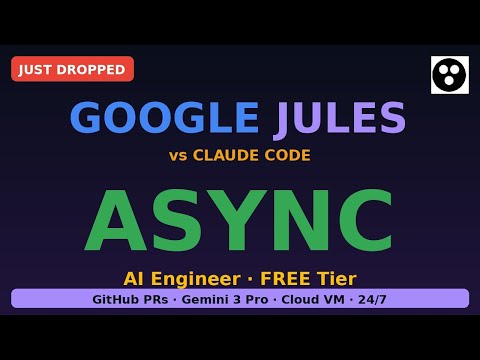


$149. One time. Lifetime updates.
Every future upload on this channel uses this exact pipeline. You are buying the same tool.
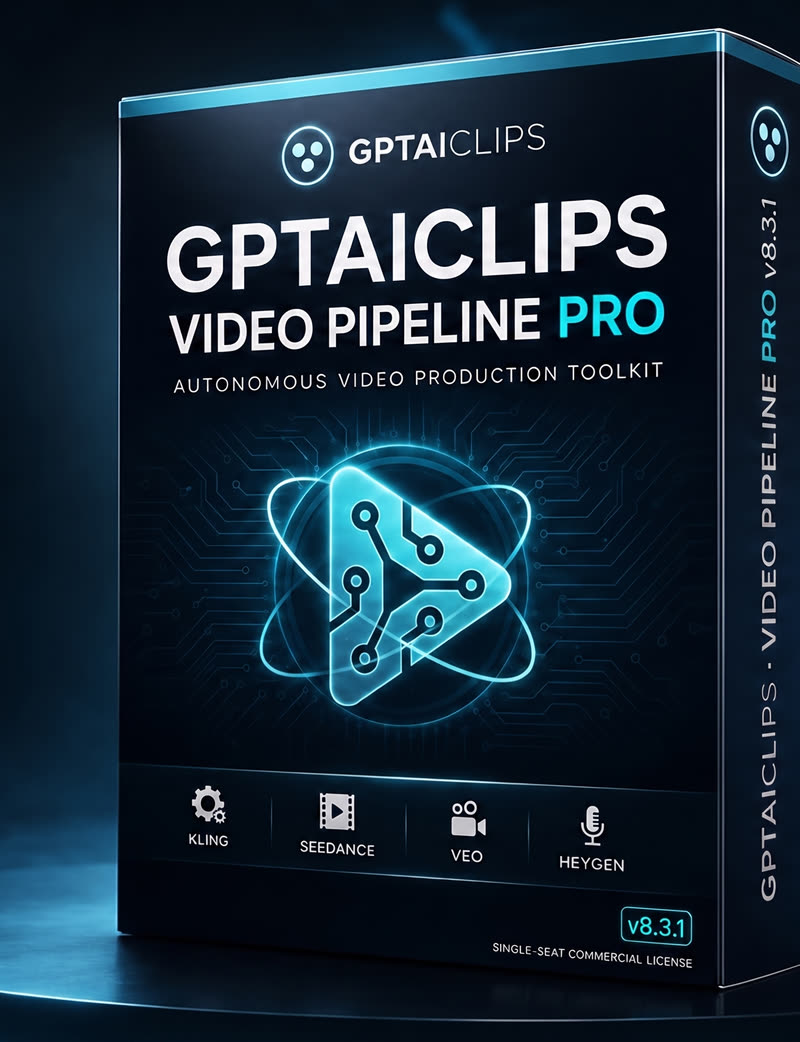
GPTAIClips Video Pipeline PRO
Autonomous video production toolkit
v8.3.1 · Single-seat commercial license- Complete gptaiclips-pipeline-pro skill — v8.3.1 versioned zip
- Six production template styles, fonts & source assets
- Full audio pack with per-scene SFX mapping
- Brand-logo registry + hard audit tooling
- Cinematic render engine, pre-built compositions
- 10-language dubbing configuration (native alt-audio)
- YouTube upload, SEO metadata & comment-pin automation
- PDF lead-magnet builder + episode cost reporter
- Documented setup — macOS, Linux, Windows (WSL)
Founding Member Launch
First 100 customers only · Save $50 today.
- Lifetime updates for the current product
- Priority feature requests
- Founder badge in the customer community
- All optimization packs released for v8.3 and after
- Locked-in forever
- 20% off future products
27 / 100 claimed · 73 remaining
When all 100 licenses are claimed, this offer is permanently retired.
Claim Founding License — $99Standard license · lifetime updates reserved for Founding Members
 Instant digital delivery — ships the moment you buy
 12 months of updates included
 Single-seat commercial license
 Full source · runs locally · zero telemetry
 Secure encrypted checkout
 Direct email support included
 $0 video production cost per episode — every render tool runs locally & free


 Secure checkout · Stripe & Gumroad
GPTAIClips Video Pipeline Pro is a production skill, not a hosted service. Runs on your machine, your API keys, your channel. Full source. Zero telemetry.